The Actisense Toolkit configures the EMU-1 – please see the Toolkit Manual for further details of how to use this software.
To change the default settings in the EMU-1 to match your installation the Actisense NGT-1 Or an NGX-1 is required. It would be advantageous to leave the NGT/NGX-1 on-board as it is a great NMEA 2000 diagnostic tool when working with our freely available software NMEA Reader. As your NMEA 2000/SeaTalkNG network grows, being able to see what messages and devices are on your network will become vital to help you understand any issues.
The Actisense NGT/NGX-1 is a very versatile PC Interface that works with a wide range of Windows software. Please look at the software compatibility page for a list of the software that can be used.
NGT/NGX-1’s use a baud rate of 115200, which is ideal for use on an NMEA 2000 network with a peak bus load below 50%. NMEA Reader displays the current “NMEA 2000 Bus Load” to help the user understand if the peak bus load is above 50%, and if so allow the user to change the NGT/NGX-1 baud rate to 230400 baud rate.
EMU-1 Default Configuration
To help you decide if you need to change the settings in the EMU-1, please refer to the default configuration below.
EMU-1 input | Setting |
G1 – Gauge 1 | Temperature Sender, 287 – 22 Ohm, VDO (40 – 120 degC) Euro |
G2 – Gauge 2 | Oil Pressure Sender, 10 – 180 Ohm, VDO (0 – 80 PSI / 0 – 5 Bar) Euro |
G3 – Gauge 3 | Disabled without configuration |
G4 – Gauge 4 | Disabled without configuration |
G5 – Gauge 5 | Disabled without configuration |
G6 – Gauge 6 | Disabled without configuration |
A1 – Alarm 1 | Disabled without configuration |
A2 – Alarm 2 | Disabled without configuration |
A3 – Alarm 3 | Disabled without configuration |
A4 – Alarm 4 | Disabled without configuration |
T1 – Tacho 1 | Alternator, ‘W’ connection – 11.78 Pulses Per Revolution (PPR) |
T2 – Tacho 2 | Disabled without configuration |
X1 – Aux 1 | Not in use (not configurable). Reserved for future feature addition. |
X2 – Aux 2 | Not in use (not configurable). Reserved for future feature addition. |
What these setting look like in Toolkit:
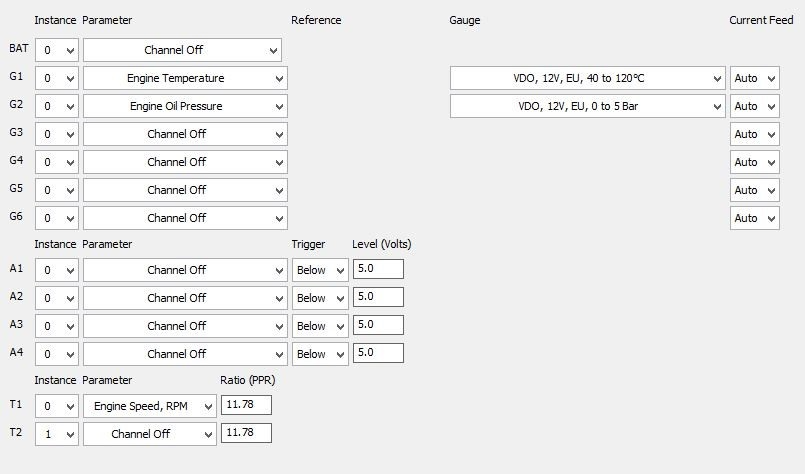
EMU-1 Default Settings
For more information on NMEA 2000 and how it works, please download our free guide to NMEA 2000 networking here: https://actisense.com/complete-guide-to-building-an-nmea-2000-network/
Was this article helpful?
That’s Great!
Thank you for your feedback
Sorry! We couldn't be helpful
Thank you for your feedback
Feedback sent
We appreciate your effort and will try to fix the article